Pages

Thursday, May 15, 2014

Activation and passivation will not happens

In Connection with my previous post Activation and passivation in ADF
 
If you uncheck following flag means
1.Enable Application module pooling
2.passivate state and Include All transient Values.
passivation wont happens.there is no active record to activate. i.e activation/passivation wont happens
then re-run your application.

then result would be.

Step 1: After Un-check flag. re-running the existing application.
enter the data press submit.


Step 2: Log shows that after each request application module & jdbc connection created and closed.

while Observing when creating a record a 
**insert** id =1,parid=1,collid=98312,...

Notice one more thing "delete all" collid=98311
collid is field of an PS_TXN table.delete "PS_TXN" where collid =:1


Finally at this end. no passivation store happens, so while activation no record fetching takes places.


Download here.

Note: Before running this application un-check the concern flag. "Activation and passivation will not happens"

Activation and passivation in ADF

Here we go with an sample application how activation/passivation works. I'm having application constructed with help of transient view object in model layer.

Step 1: Enable Application Module Pooling.


By default flag checked. with the help of this flag activation/passivation will happens.


Step 2: Creation of transient view object


Step 3: Checking all transient attribute for performing passivation.


if you do the step2 means all value all those attributes in this transient viewobject will be passivated.

Step 4: All attributes passivate flag is checked. 


Note : if you dont want to passivate all attributes in an viewobject means don't check "Including All Transient Values"

you can able to passivate the transient needed individual attribute.
see the following figure.


That's all now activation/passivation will handle by the framework by default.
It will works upon Application Module Connection pooling parameters.

Step 5: Same Transient View objects instance shared in two jspx pages one as af: form and another one as af:table.

Step 6: for debugging use this -Djbo.debugoutput=console
DC Instantiation happening.


Loading BC4J default properties and as previous blog told that       PS_TXN creation.                                              

 
Additional logs.                                                                                                                                                                    

Step 7: After pressing create insert button.


Along with its log. 


Step 8:  After Submit the data to server.


Along with its log.


Step 8: Go to next View page.


 Finally record passivate gets activated.


Download here

Application Module Pooling in ADF

Here I got a time to share a few things. Now days, one of the basic interview question in application module is what is application module pooling.

Oracle documentation says that,  "An application module pool is a collection application module instances of the same type."

While speaking application module pooling, activation and passivation comes into the picture.
 
Say as an e.g: If an application module pool has 5 application module instance. All of the application module instance are occupied. 4 instance are occupied and servicing their request. one instance is occupied. but user is in idle state.

Now this time a new user performing a request means application module pool check for application module instance Is there any idle.? 

If so, suddenly scan the user session data into insert into PS_TXN table. This store mechanism is called passivation. Now new user can utilizes the application module instance.

When idle user resume his work, framework will automatically retrieve his own data.
id will be handled at PS_TXN table level and Session Management too.

In below figure you can see the PS_TXN table. 


Friday, January 10, 2014

How to Create a Row for Programmatic ViewObject

For a programmatic created view object there are are two ways to create row and insert the data into row from Application Module

All we needed to do.,  Just a single step.


or else we need to use VOImpland VORowimpl class to do that.
here we go..


However, result will be same.


Download here

Wednesday, December 25, 2013

Sharing VO instance Across the Application Module.

 In Previous post I say that how to access the common application module(CommonAM) via java class. As i said earlier that there is a lot of ways to achieve that.

If you see my previous post at that end of the post i say that "I'll later explain little more simplifier than this post."

here is the way. 
All setup of the application is same as of previous post. just all we needed to do two important steps to achieve that. 

Step 1: Current Application(WorkApp). it doesnt have any entity,view objects.the snap which is showing EmployeesView is under the model imported from ADFSharedLib.
Just shuffle the EmployeeView to right hand side that is WorkAM. now you can able access the ViewObject instance.


Step 2: Just same method But now I'm writing in WorkAM implementation class. somehow altering some piece of line make more simpler.


if i follow above for 'n' Application module. then code duplication we will happens each every Application module implementation class. so re-usability will fail in my case. not for all of your cases.

Step 3: let us check the db data for the employee id '100'.


Step 4: Now i'm going the run BC tester.


Step 5: check the db data again for the employee id '100'.


finally get updated. this simple techniques get works. 


In next post I'll explain this how to do this same via bean through Bean through Datacontrol.


Tuesday, December 24, 2013

Access Application module from simple Java Class.

I got a requirement like accessing AM from a java class

Say as e.g.:           
           
Where I have a common Application Module(name it as CommonAM from CommonApp). 
It folds of common Entity Objects, ViewObjects. this CommonApp make it as ADFSharedLib).
This ADFSharedLib invoked it in each and every 'n' Projects. 
Then I try to access that commonAM and its entities and views in other Projects.

Note:
I dont want to use a Bean to access the commonAM via DataControl. 

So, I want to use one Java Class across all other Application Modules.

There are lot of ways to achieve that.
Here I'm going to share one way.I'm not sure this recommend practice. but we can also do by the way.

Step 1: Following Figure that how my CommonApp looks just employee eo , vo.


Step 2: I packed the CommonApp as ADFSharedLib.


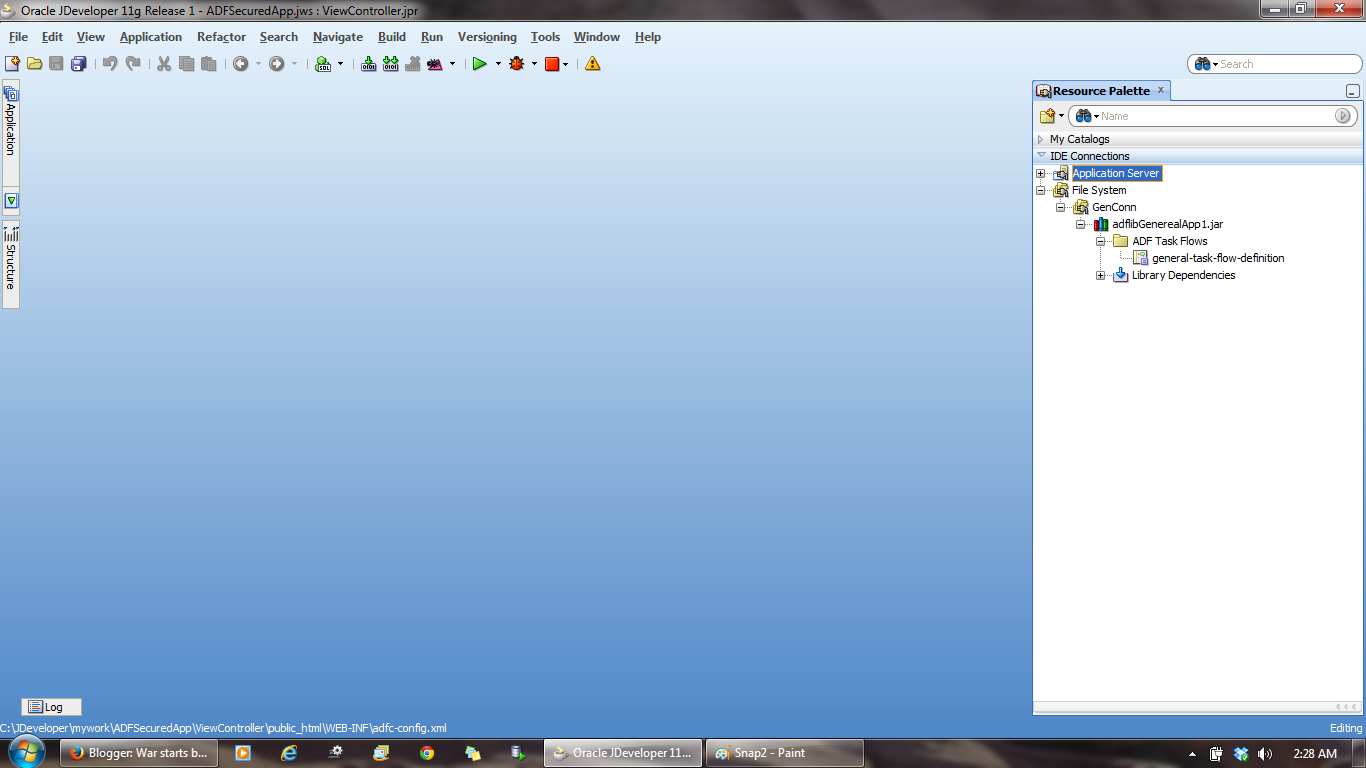
Step 3: I'm trying to invoke the ADFSharedlib from File system.


Step 4: By creating root application while invoking the method at run time. I can able to access my view objects instances. 

say as e.g.: Creating a programmatic view criteria find the employee id and updating the salary...

After commit. there is no need to act as root. so i release the resource.


Step 5: finally i invoke this from current working application. that is WorkApp.
I'm trying to execute that from WorkAM.


Step 6: before executing let us check the db data. Now for the employee id '100' having the salary 2400.


 Step 7: Now i'm going to execute this method from BC Tester.


Step 8: After execution let us check in db. salary of the employee. 


It's updated. 
By this way i can able to communicate with my commonAM.

CommonApp Download here

WorkApp Download here

I'll later explain little more simplifier than this post. check this post.

Saturday, November 30, 2013

Show web Pages imported from ADF libraries

Context i'm going to speaking is stated as in subject you can see that option in jazn-data.xml.

when it will useful you may ask.

Consider the Scenario your main application is fully bounded with help of ADFSecurity. your child application not having security,

if you are try to consume Taskflow from your child application to the main application. ADFSecurity wont allow unauthorized Taskflow invocation.
 

we should make entry in jazn.xml to make it authorized. However you can't able to see your Child Application Taskflow even after imported.


At that time check the option you can able to see that child application taskflow.

To confirm the above statement. here i gave the snapshots. 


Step 1: Secured Application(ADFSecuredApp).


Step 2: non - Secured Application(Genereal App).


Step 3: Make non-secured(GenerealApp) it as ADFLibrary. why mean i need the "general" task flow in secured application(ADFSecured App)


Step 4: you can see secured index page in ADFSecured Application


Step 5: Now in this ADFc-Config of Secured(ADFSecured Application) trying to invoke the non-Secured(Genereal Application). now if you run this page that taskflow never invoke.why because means not giving access to that bounded taskflow.
 

Step 6: Registering the Taskflow as Secured you can choose the Taskflow from drop down. but it is not avialable. even though you imported the non-secured(Genereal application). 


Step 7: Now By checking the box you can able to see the imported Taskflow.


Step 8: Now Make it as authorized.


Step 9: After that Running the ADFSecured Application.


Step 10: you can see your index page.


Step 11: finally i can able to invoke the Genereal Application Taskflow in ADFSecured Application.


Download here

Integrating the Taskflow in One Application.

Nowdays, Each and Every Application has own Taskflow flying on their own. Integrating the Taskflows is Main work.

Consider like this say as eg. 
First Application  -  folds of some Task Flow
Second Application -  folds of some Task Flow
Main Application   -  Consume/Integrate the Taskflow in Existing Application.


Major thing no need to duplicate all those things.In the Sense we can Re-use it.

Step 1: Try to deploy your ViewController of First Application.


Step 2: deploy it as ADFLibraryJar


 Step 3: Note it down the location after the jar deployed successfully.


Step 4: Use File Connection to invoke that ADFLibraryJar


Step 4: Test your Connection.


Note : upto this step to do the same for the Second Application also.

Step 5: Try to Add it to your main application.


 Step 6: finally I consumed two taskflow in my main application as a region.


Step 7: Main Page of your main application render the two consumed Taskflow of existing application.


Just i'm giving a picture about this topic. how to do. Based on their requirment you flex it.

Download here